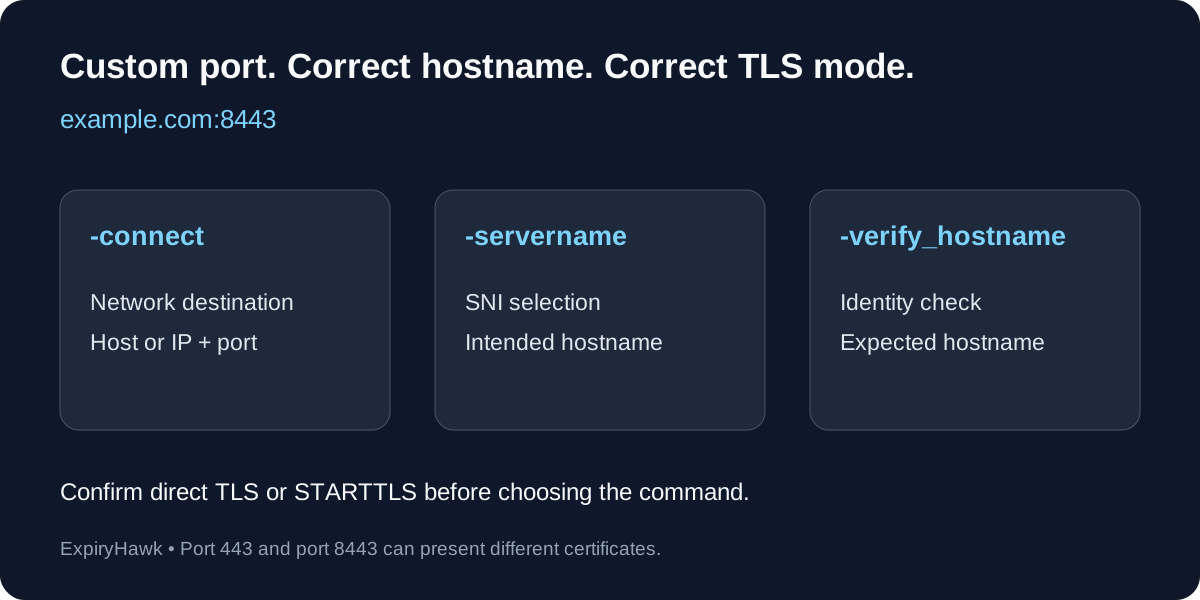
To check an SSL certificate on a custom port, pass the hostname and port to openssl s_client -connect, then inspect the certificate with openssl x509. Include -servername with the intended hostname so a shared server can select the right certificate. Checking port 443 does not tell you which certificate a separate service presents on port 8443.
1. Connect to the Correct TLS Port#
For a service that starts TLS immediately on port 8443, run:
openssl s_client -connect example.com:8443 -servername example.com </dev/null \
  | openssl x509 -noout -dates -subject -issuer
Replace the hostname and port with your service’s details. Do not include https:// or a URL path in -connect. The output shows the certificate’s validity dates, subject, and issuer.
notAfter is the expiry date; notBefore is the beginning of validity. OpenSSL documents these output options in its x509 manual.
Keep diagnostic output visible if the command fails. A connection refusal, timeout, or unreadable certificate is a failed check—not evidence that the certificate is valid.
2. Keep the Destination and Hostname Separate#
You can connect directly to a known server IP while requesting the certificate for a hostname:
openssl s_client -connect 192.0.2.10:8443 -servername example.com </dev/null \
  | openssl x509 -noout -enddate -fingerprint -sha256
Replace the documentation IP with your server’s address. This is useful when comparing individual load balancer nodes or testing deployment before a DNS change.
The IP and port select the network destination. SNI supplies the intended hostname during the TLS handshake. It does not itself verify that the returned certificate covers that hostname.
3. Check Identity and Trust Separately#
Printing a certificate is an inspection step, not complete validation. For a validation attempt against your machine’s configured trust store:
openssl s_client -connect example.com:8443 \
  -servername example.com -verify_hostname example.com \
  -verify_return_error </dev/null
Read the verification result and any errors. Private services may require an explicitly configured private CA trust file. A browser and your command-line environment can use different trust settings, so their results may differ.
The s_client documentation explains the connection, SNI, and verification options.
4. Confirm Whether the Service Uses STARTTLS#
A custom port number does not identify the application protocol. The commands above assume TLS begins immediately. A service that first exchanges plaintext protocol messages and then upgrades to TLS requires the appropriate -starttls option, such as -starttls smtp for an SMTP service that supports that upgrade.
Check the service configuration before choosing the command. Sending a direct TLS handshake to a plaintext or STARTTLS listener can produce misleading protocol errors. A nonstandard port is not automatically HTTPS.
Record Each Endpoint After Renewal#
Track the hostname, port, and TLS mode together. Repeat checks for every relevant listener after renewal, including internal services reachable only through your private network. Separate listeners can load different certificate files.
For expiry thresholds and scripting, see How to Check SSL Expiry with OpenSSL. Use ExpiryHawk as part of your certificate-maintenance workflow, while verifying custom-port endpoints with tools that explicitly support the required port and protocol.