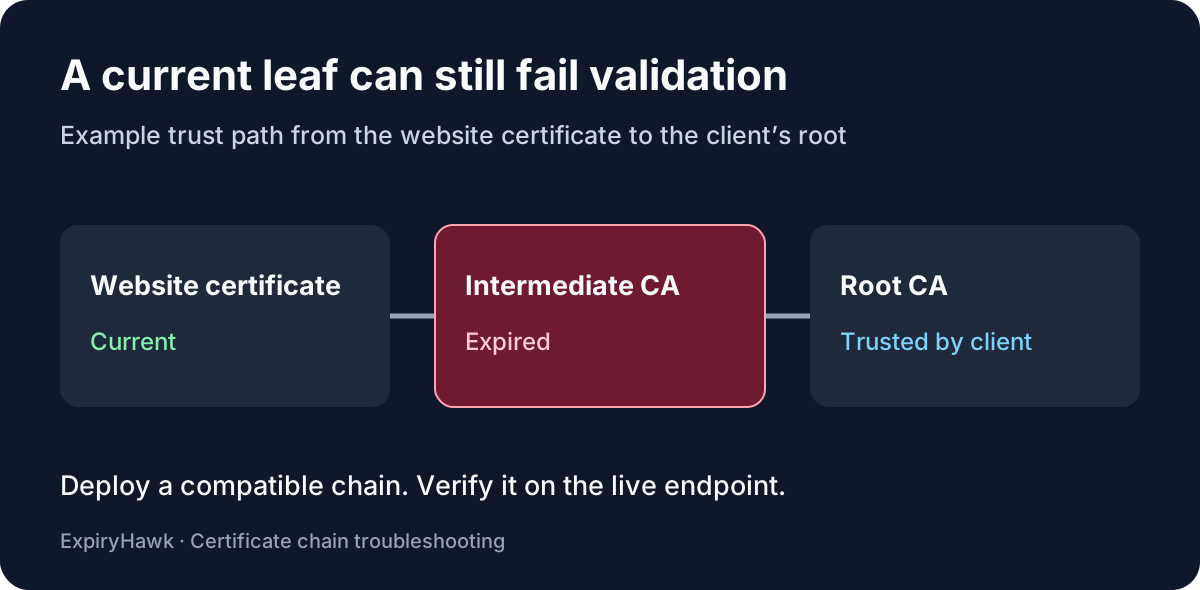
An expired intermediate certificate can break HTTPS even when your website certificate is still current. If a client builds its trust path through that expired intermediate, validation can fail. Check which certificate expired, then deploy the current chain recommended by your certificate authority (CA). Renewing the website certificate alone may leave the same stale chain in place.
1. Find the failing certificate#
Run this against the hostname visitors actually use:
openssl s_client -connect example.com:443 -servername example.com \
  -showcerts -verify_hostname example.com -verify_return_error </dev/null
Replace both instances of example.com. Look for certificate has expired and the nearby depth and subject. Depth 0 refers to the website certificate, also called the leaf. Depth 1 is its issuer in the path OpenSSL tried to validate; confirm the subject before assuming it is an intermediate.
The OpenSSL manual distinguishes the certificates sent by the server from the path OpenSSL builds. A strict check can stop before printing the full list. To inspect the certificates the server sends, rerun without -verify_return_error. Copy each relevant PEM block, including its BEGIN and END lines, into its own file:
openssl x509 -in intermediate.pem -noout -subject -issuer -datesCheck notAfter on each certificate. A stale certificate in the server’s list is a clue; the validation error tells you whether it affected the path this client tried. RFC 5280 requires certificates in the path to be valid at the time of validation.
2. Replace the chain at the TLS endpoint#
Get the current chain from your CA or managed hosting provider. It must work with your existing leaf certificate; a newer intermediate with a similar name may belong to a different chain. If the CA cannot provide a valid chain for the existing leaf, ask whether it needs reissuing.
Install the bundle where clients connect: a CDN, load balancer, or web server. For NGINX, the HTTPS configuration guide shows the leaf first and the intermediates after it. On Apache HTTP Server 2.4.8 and later, SSLCertificateFile can include intermediates, making the separate legacy chain directive obsolete. Check what your configuration actually loads before changing it, then test and reload the service.
3. Verify from the affected client#
Repeat the strict OpenSSL check against the live hostname and retest on the device that reported the error. Check other active listeners or nodes if results vary. Different clients can build different trust paths, so a pass on your laptop may not reproduce the affected client’s experience. See Why Your SSL Certificate Works on One Device but Not Another for help comparing those results.
Use the ExpiryHawk SSL Checker for a quick check of the public hostname, alongside the chain verification above.