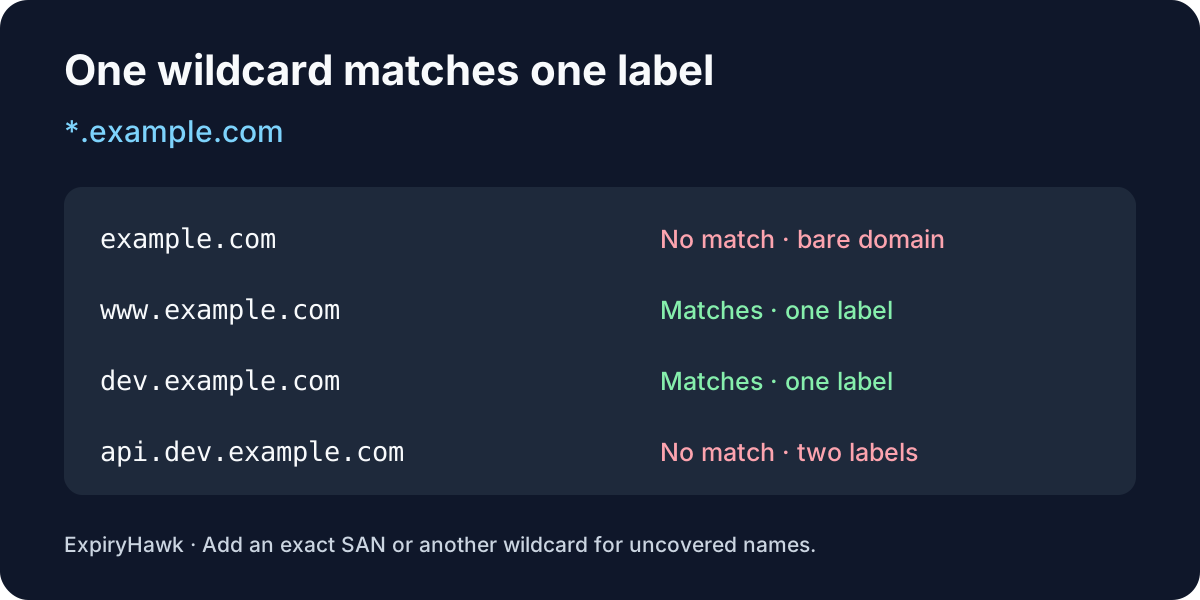
No. A wildcard SSL certificate for *.example.com covers one level of subdomains, such as www.example.com and api.example.com. It does not cover the bare domain example.com or a deeper name like api.dev.example.com unless the certificate also lists a matching name. The wildcard replaces exactly one label, the part of the hostname between two dots.
1. Map the hostnames you actually use#
Start with the names visitors and applications connect to, including the bare domain, redirect destinations, and staging or API hosts. Compare those names with the wildcard pattern.
| Hostname | Covered by *.example.com alone? |
|---|---|
example.com | No: there is no label before example.com. |
www.example.com | Yes: www replaces the wildcard. |
dev.example.com | Yes: dev replaces the wildcard. |
api.dev.example.com | No: api.dev has two labels. |
RFC 9525, section 6.3 defines this matching rule. An HTTPS redirect does not fix a mismatch: the client checks the certificate on the original hostname before it can receive the redirect.
2. Add exact names or a second wildcard where needed#
To serve both the bare domain and its first-level subdomains with one certificate, request two DNS names in the Subject Alternative Name (SAN) extension: example.com and *.example.com. Check the issued certificate rather than assuming your provider includes both.
For a single nested host, add its exact name, such as api.dev.example.com. If you operate several hosts under dev.example.com, a separate *.dev.example.com entry covers names like api.dev.example.com and build.dev.example.com. That second wildcard still does not cover dev.example.com itself.
If you use Let’s Encrypt, plan for DNS-01 validation when requesting a wildcard. HTTP-01 cannot issue a wildcard certificate.
3. Check the certificate clients actually receive#
On a machine with OpenSSL, run this against the exact public hostname that needs coverage:
openssl s_client -connect api.dev.example.com:443 \
  -servername api.dev.example.com </dev/null \
  | openssl x509 -noout -ext subjectAltName
Replace both hostname occurrences. The first command connects to the live endpoint and sends the hostname through SNI so a shared server can select a certificate. The second prints the SAN entries; it does not establish chain trust or validate the connection. See the OpenSSL x509 manual for inspection options.
Repeat the check at the CDN or load balancer your users reach after deploying a replacement. If you also need to check the expiry date from the terminal, follow How to Check SSL Expiry with OpenSSL. For a quick public endpoint check, enter the exact hostname in the ExpiryHawk SSL Checker.