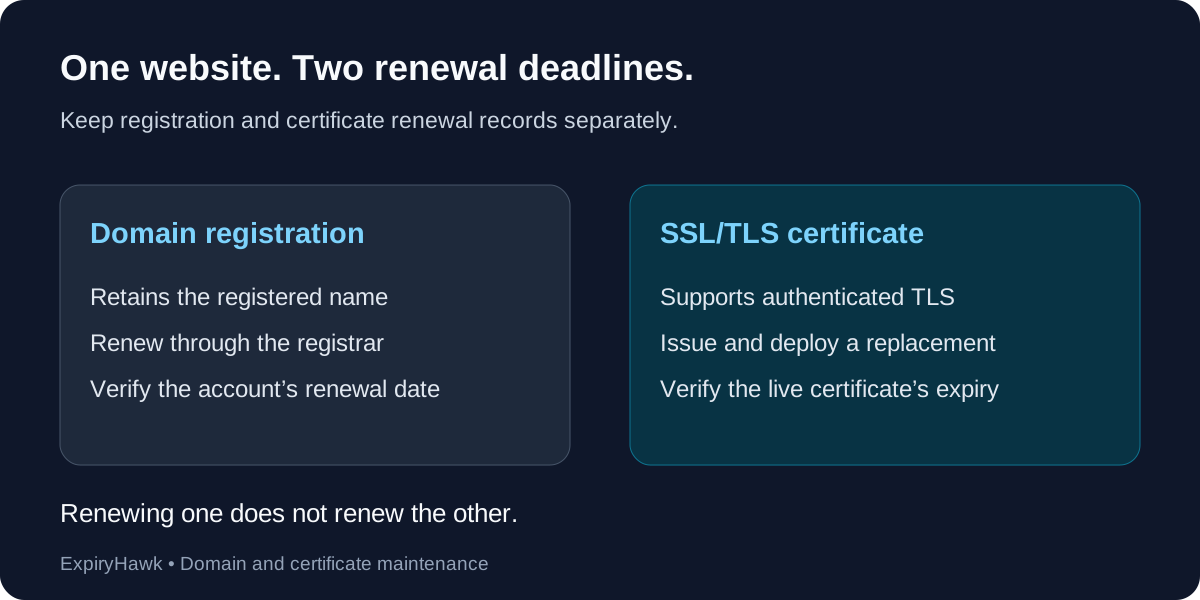
Domain expiry ends your domain registration term; SSL expiry ends a certificate’s validity period. Renewing one does not renew the other. Your domain can remain registered while its HTTPS certificate expires, and a current certificate cannot keep an expired domain registration working. Track both deadlines separately, even when one provider manages everything.
What Each Expiry Date Controls#
A domain registration lets you retain the registered name through your registrar. An SSL/TLS certificate supports authenticated, encrypted connections for the names it covers. Hosting, DNS, registration, and certificates are related services, but their renewal arrangements can differ.
| Question | Domain registration | SSL/TLS certificate |
|---|---|---|
| Where do you check? | Registrar account and renewal records | Certificate presented by the live service |
| What needs renewal? | The registration term | A replacement certificate must be issued and deployed |
| What can fail? | Domain-dependent website and email access | Clients may reject HTTPS or other TLS connections |
| Does renewing the other fix it? | No | No |
ICANN’s domain renewal guide explains why registration renewal matters for associated services. Certificate validity has its own start and end dates, described in RFC 5280.
1. Confirm the Domain Renewal Deadline#
Sign in to the registrar account that manages your domain. Check the registration expiry date, auto-renewal setting, payment method, and contact email. Keep a record of who can access the account and resolve a failed payment.
Do not plan around a presumed grace period. Expiration handling and recovery options vary by registrar and domain extension. Country-code domains may follow different rules from generic top-level domains. If a domain has already expired, contact the registrar promptly rather than waiting for DNS changes to settle.
ICANN’s renewal and expiration FAQ describes recovery considerations for the domains covered by its policies.
2. Check the Live SSL Certificate Separately#
Inspect the certificate served by your public HTTPS hostname and note its expiry date. Repeat for important hostnames such as www and application subdomains: they may use different certificates or providers.
A certificate file on the server is not enough. A CDN or load balancer may terminate the public connection and present a different certificate. For practical checking methods, see How to Check Your SSL Certificate Expiry Date.
3. Diagnose the Right Renewal Problem#
An expired certificate can produce a browser privacy warning while domain registration and DNS remain active. A registration problem can interrupt name resolution or redirect the domain to a registrar page, so visitors may never reach your HTTPS service.
These are clues, not definitive diagnoses. DNS configuration mistakes, hosting outages, and certificate deployment errors can produce similar symptoms. Check the registrar status and the live connection before buying or renewing anything.
4. Keep Two Renewal Records#
Record each deadline, the responsible provider, the account owner, and the renewal method. Enable available automation, verify successful renewals, and set reminders early enough to recover from account or validation problems.
After domain renewal, confirm the registrar’s updated status. After certificate renewal, verify the replacement on the public endpoint. Use the ExpiryHawk SSL Checker for the certificate check, and your registrar account for the domain registration deadline.